Power BI Embedded: Delivering Business Intelligence at scale without individual Power BI licenses
:focal())
A new way to share reports with Power BI Embedded
Providing Power BI reports to employees, customers, or partners often means managing access rights, licenses, and the overall user experience. With Power BI Embedded, there is another approach: reports and dashboards can be integrated directly into a secure and customized web portal, without requiring every end user to have an individual Power BI Pro license.
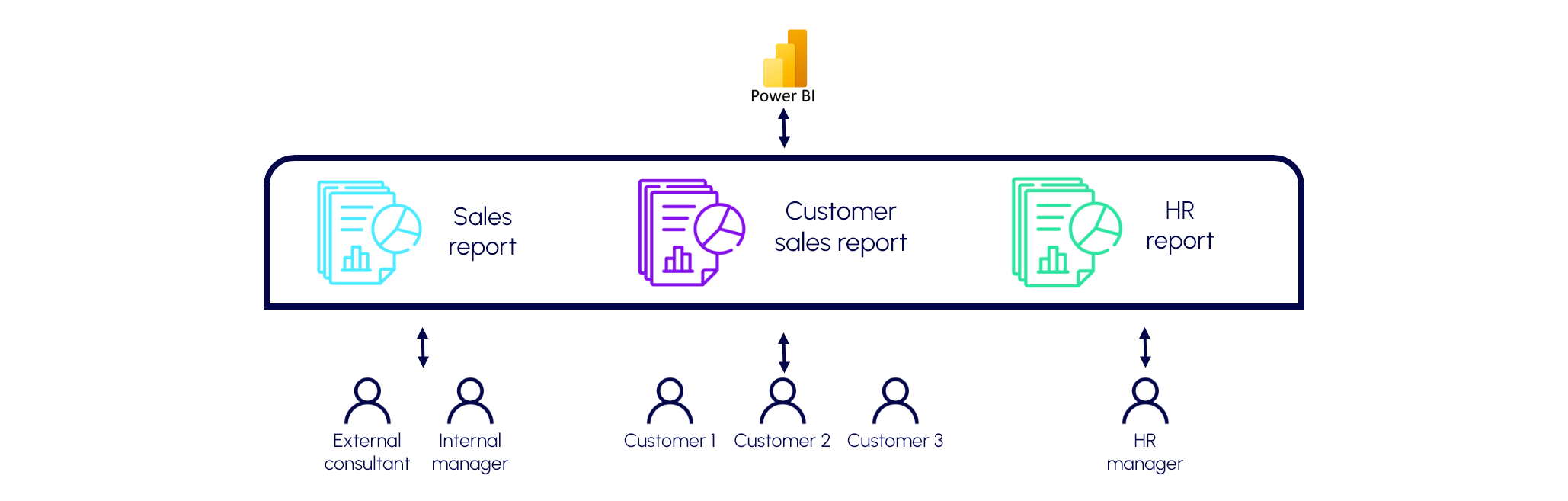
A Power BI experience integrated into a business portal
Users sign in to the portal with their usual account and directly access the reports they are authorized to view.
They do not need to open the Power BI Service, know which workspace contains the report, or navigate through the Microsoft Power BI environment. Reports become a natural part of the portal, just like any other customer area or business application.
The interface can be fully adapted to the company's needs:
authentication with Microsoft Entra ID;
a customized catalogue of available reports;
access management by user or group;
multilingual interface;
simplified navigation;
full-screen report display;
configurable Power BI filters and options;
integration with other business features available in the portal.
No Power BI Pro license required for every user
One of the main advantages of Power BI Embedded is its licensing model.
In a traditional Power BI architecture, distributing content may require individual Power BI licenses to be assigned to users.
With a Power BI Embedded architecture based on an appropriate capacity, the cost is associated with the capacity running the reports rather than with a Power BI Pro license assigned to every consumer.
This can become particularly attractive when reports need to be delivered to dozens, hundreds, or even thousands of users, especially external users.
The organization can therefore adopt a model where a centralized capacity powers the portal, while users consume reports without requiring an individual Power BI Pro license.
The capacity size and licensing model should, of course, be selected according to the architecture and the type of users involved.
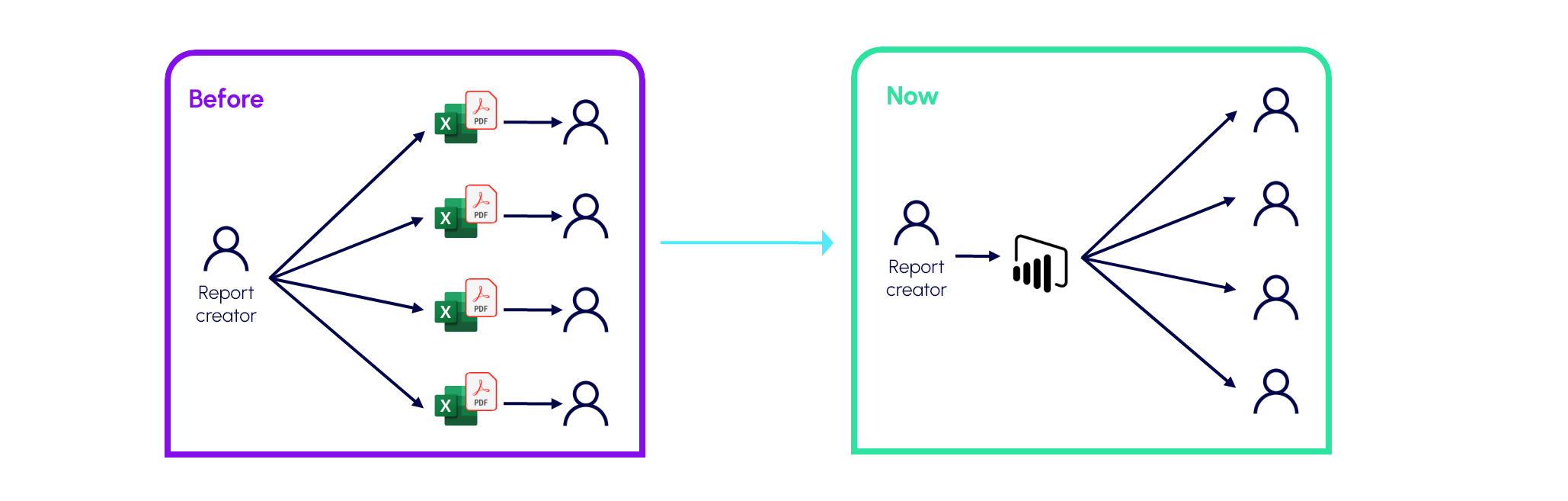
Security remains at the core of the architecture
Removing the need for an individual license does not mean removing access controls.
An Embedded portal can combine several levels of security.
Authentication identifies the user through Microsoft Entra ID. An application layer then determines which reports that user is allowed to access.
Power BI can also apply Row-Level Security (RLS) to restrict the data visible inside the same report.
For example, two customers may open exactly the same report while seeing completely different data.
Permissions are enforced server-side, meaning that changing a URL or attempting to access another report directly is not enough to bypass the security model.
Centralized administration
An Embedded portal can also include a complete administration layer.
Administrators can:
activate or deactivate users;
assign reports to users or groups;
manage roles;
control which report features are available;
monitor access;
manage report display settings.
Report distribution is therefore no longer limited to Power BI workspace management. It becomes an integrated capability of the company's information system.
A better experience for the end user
Power BI Embedded also helps remove the boundary between reporting and business applications.
From the user's perspective, there is no longer a separate “portal” and “Power BI.” Instead, there is one application where data and KPIs are available in the right context.
This approach provides a simpler experience, better aligned with the company's branding, and is particularly well suited to users who do not work with Power BI on a daily basis.
From Business Intelligence to Data Applications
Power BI Embedded also reflects a broader evolution of Business Intelligence.
A report can now become a component of a broader Data Application, combining reporting, operational data, and interactive capabilities.
With Microsoft Fabric, for example, a single platform can centralize the data, perform transformations, expose Power BI semantic models, and power an Embedded portal.
The portal can then evolve over time with additional capabilities such as comments, workflows, alerts, data input, artificial intelligence, or integrations with other business applications.
Conclusion
Power BI Embedded turns Power BI reporting into a true digital service.
It provides three major benefits:
Scalable report distribution, including to customers and external partners.
A fully integrated and customizable user experience, without requiring users to navigate through the Power BI Service.
A capacity-based licensing model, which in the appropriate architecture can avoid assigning a Power BI Pro license to every report consumer.
For organizations looking to industrialize and scale the distribution of their data, Power BI Embedded provides a strong bridge between Microsoft Fabric, Power BI, and the business applications of tomorrow.
FAQ
Not for viewing reports through an embedded portal. Access is delivered through the application, and the cost sits in the capacity.
No. It works for employees, customers, partners and suppliers. It is especially useful when many people need access or when they only look at data from time to time.
Entra ID identifies the user, and the application decides which reports they can open. RLS rules in the semantic model then limit which data they see inside those reports. Exact implementation details depend on your setup.
It depends on the capacity you need and the types of users you serve. We can help you compare it with a licence-per-user model for your situation.
Power BI Embedded works best when many of your viewers are external or occasional, or when you want reports to appear inside your own branded application.
:focal())
Does Power BI Embedded fit your business?
Get a quick assessment of your viewers, usage and likely costs.